
Workiversary
You know what's sad? Selling the prime hours of your human existence in the era of adulthood most likely to contain good health in exchange for just enough money to survive. You know what's even sadder? When you do a whole year of that and your employer doesn't even say thank you.
My goal in building Workiversary was simple: restore one metric smidge of dignity back into the workplace by making it easy for employers to say, "Hey, thanks for taking an entire trip around the sun with us." The premise behind it is simple: being kind is contagious and hopefully having regular signs of gratitude at your job creates kinder interactions between the different strata of leadership as well as peer to peer.
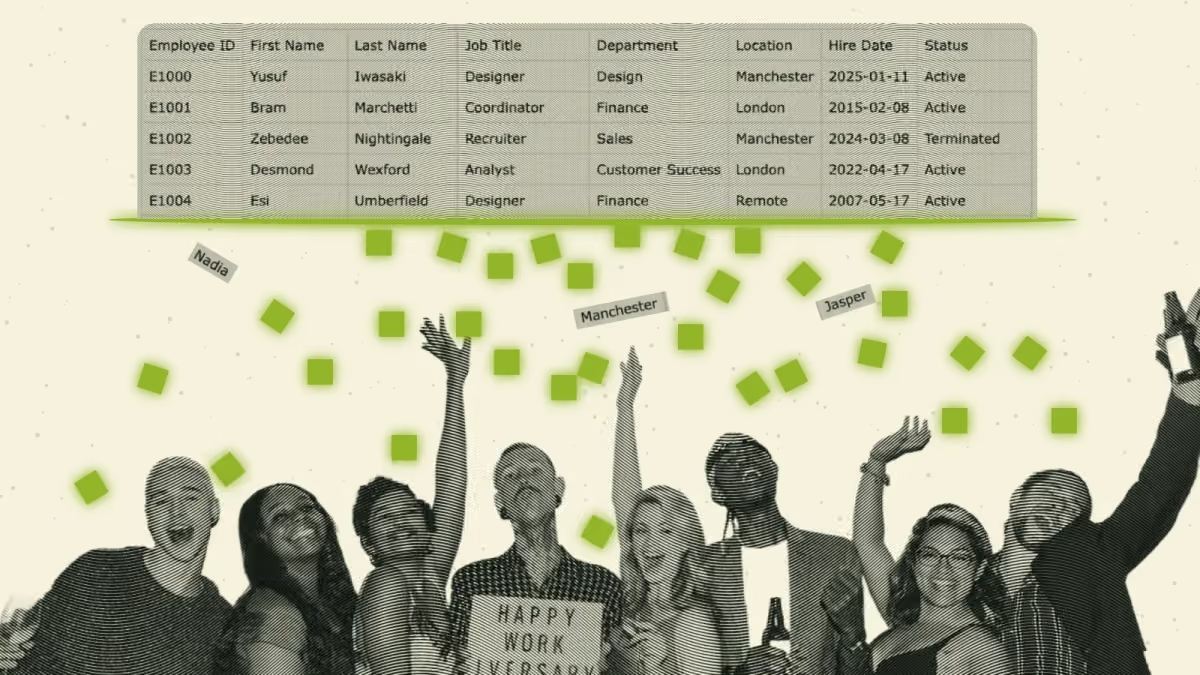
Make a website that turns HR software spreadsheets into cute-as-hell employee anniversary videos.
Now, I also knew from past heartbreak that my own lovingly crafted employee programs tend to wither on the vine when you're no longer available to tend to them. Such is life. But when baseline human niceties like "hey, I noticed you've been with us for one more year" become a casualty of an organizational shuffle, all of a sudden those "nice to have" staff recognition programs wind up on a proof point list of how much this job has really fallen off. It's a bad spot to be in.
So we have to lower the barrier to entry. If your job could potentially include recognizing peers for their time with the company, putting together the recognition should be easy to do, fun to look at, and be super accurate because the lowest you can go on the sad scale is: everybody else getting recognized except you. Woof.
Introducing Workiversary
Workiversary is a little gift to everybody who is selling their time and energy for money at a company with too many employees to say thanks individually in an all-company meeting. Workiversary makes anniversary videos out of lists.
The short version of how it works: you visit the website, select an employee roster spreadsheet on your machine, tell it what month you're celebrating anniversaries for, load in company logo, share a brand color, and a few moments later you're downloading a dynamic music video celebrating those people in a retro movie credits style.
The cool thing about it? This all happens in your browser where none of your employee data leaves your machine. No software downloads required. Also, it's totally free. Not just for you, but for me as well (technical details below). This is just a fancy bunch of scripts loading a bunch of corporate-friendly open source software projects on a free Cloudflare account. Spreadsheets go in (but never leave your system) and videos of astonishing quality come out faster than you can watch them.
What I wanted Workiversary to do
Look like a 70s movie credit scene
I'm a sucker for a retro aesthetic. I wanted V1 of Workiversary to feature grain, wiggle, drifty type with good easing, and transitions that move like a Kodak slide carousel, shutter and all. I also wanted music front and center, with a visualizer that automatically adjusts to the music you provide. And I wanted that visualizer rhythmically dancing in the background of every scene. It's movie credits thanking the cast and crew that are your coworkers. And really, what good are credits without good music?
Four scenes, four visualizers.
Adapt to your brand as quickly as possible
All we need is a company logo file or just a typed name. Pick a font pair that's a close fit and if you're feeling particularly brand-loyal, paste your brand's HEX color values. Boom, the video is now using your colors. But regardless of how much or how little you do on the tab for brand customization, you're still gonna make a video that blows people away.
Magically convert gnarly spreadsheets into clean lists
With a lot of testing, I taught Workiversary how to untangle the jankiest CSV and Excel files I could whip up. Users just drop in the export their HR system already makes. All it needs is names and start dates. Then users pick a month and it finds everyone celebrating that month. It's that easy.

Give you easy content filters and people-pickers
I knew feature request #1 was going to be list filtering, so I went ahead and built it in an open-ended fashion. Any column in your spreadsheet can become a filter. Tick an office or an employee type off and they're gone! Wanna make a video just for Customer Success? Easy, with the same file you uploaded, you can make a video for just your team. No more copy-paste mistakes, and no more leaving out Tony, who secretly logged in to Town Hall while on paternity leave for his ten-year anniversary shout-outs. Sorry about that, Tony!
Generate a save point without a login or cloud storage
I'm dead serious in my conviction to not store anybody's sensitive employee data anywhere. Your files and settings live in your browser's cache, which occasionally gets wiped out. So I built a save feature that takes all the customization you've made thus far and lets you plug it back in should your cache ever get cleared.
Spit out a paste-able text list for when you post your video
While formatting a spreadsheet into a video is crazy hard, sometimes converting a spreadsheet list into something that looks nice in Slack or an email newsletter can be a drag too. No worries. I took the liberty of writing your copy and grouping your people in text-form too. You're very welcome.
Thanks for being here
Employee recognition has been a passion of mine since I worked in an extremely social and close-knit startup that was already doing this kind of thing. A few years into working there, I wound up taking the reins of employee experience and figuring out in real time how to scale a culture that I really loved. Later, these systemization-of-culture skills became something that felt like a mode of survival when that startup got acquired by its largest competitor and I was suddenly put in charge of employee engagement at a company six times bigger right as the COVID pandemic was kicking off.
Thus the first employee anniversary music video was born. In my tenure I wound up making well over 50 of these, each one a total pain in the ass, but a labor of love nonetheless. Workiversary is a project I wish I could've gifted myself and every Employee Experience or Culture & Engagement direct report under me who had to endure the agony of learning Adobe After Effects or DaVinci Resolve. The output and sharing of these videos is a good thing to do. But they're painful to make. Or rather, they were painful to make.
One of our early employee recognition videos
In the 5+ years I spent with "make employees feel seen and appreciated" as a key item on a long list of to-dos, I kept wondering if somebody somewhere (ideally on the platforms that offer up stock templates that my company was willing to pay for) had a video template that would do what I wanted it to do - celebrate anniversaries by year with a name crawl or animation for a large group of people. I looked hard and couldn't find it. Usually around 1am the night before a Town Hall once or twice per year, I'd find myself Googling once again to see if anybody anywhere had made something that could save me a tremendous amount of time. Alas, no.
Problem 1: Ugly-ass data
For my team, HR would set up a monthly scheduled report of people who are celebrating a work anniversary that month. And suddenly you realize "who is turning 2 this month" is actually a more complicated question than you were anticipating. You'd get an unformatted list of people with a start date, and sometimes two start dates because oh, this person left and came back, oh and this person is on leave right now and oh, management here seems to think contractors don't deserve employee recognition. Office politics aside, from a purely data standpoint, even just name field data was often a mess, start date formats might change partway through different eras, and often times there was a load of other data you didn't need.
HR software generated reports: usually a mess
Problem 2: Not everyone is a motion graphics designer
Once you get a sanitized, filtered, alphabetized list broken into annual cohorts, now you have to put on your motion graphics animator hat and figure out how to do a lot of math to keep each person's name on screen for the exact same duration of time. I'm a nerd with a calculator on my desk and enough scripting knowledge in DaVinci Resolve to have made something that took this process down to about fifteen minutes to make each time. But those early drafts took hours. And the peers that I handed my special system to inherited a lot of bugs and a steep learning curve.

The solution: ditch the video editor for people who never wanted to be video editors
It has been wild to see just how good browsers have become at creating animated visual effects in just the last decade. And as somebody who has spent considerable time in SaaS marketing trying to recreate existing animations in a video editor, in plenty of cases, building an animation that behaves predictably is quite a bit easier in code.
So for this project I figured, why even involve the likes of Premiere Pro or DaVinci Resolve. Let's effectively build an animated website slideshow with a big fat "export to video" button on it. And that's what we did.
TangentWeb Dev Nerd Talk▸
Here's the catch. A browser can already do almost every part of making a video. It can encode full HD (1080p) video faster than the video plays, save the finished file straight to your computer, and analyze a song closely enough to make the animations dance to it. What it can't do is take a picture of a web page. And a video is just a long run of pictures.
The first version of the reel was built like a normal web page (HTML and CSS), and it looked great on screen. But browsers have no built-in way to turn a web page into a video frame. The one known workaround is to wrap the page in an SVG and paint it onto a canvas. In current Chrome it shows nothing at all, and even where it does work, it drops the blending, filters and 3D that the whole retro look depends on.
A canvas is different: it's a drawing surface the browser treats as a picture from the start. So we rebuilt the entire reel by drawing it on a canvas, one scene at a time. We checked each scene against the original until the two matched, then threw the original away.
How it works
Like all true software, Workiversary is actually 4 open-source libraries and 10 fonts in a trench coat with a pretty "I made this all myself" wrapper.
Interpreting your messy data
We use SheetJS to read the spreadsheet in your browser. It's hooked up to read the file the way a person would. It finds the two columns that matter, names and start dates, and ignores everything else. It figures out how each column writes its dates, catches people who left and came back, and flags anyone on leave. When it really can't tell what something means, it stops and asks you instead of making its best guess and hoping.
TangentData Nerd Talk▸
Messy HR has a lot of common problems we try to solve up front: Birthday columns sit right next to hire dates, so they're excluded by fuzzy name in four languages. Does your country put the day or month first? 03/04/2019 could be March or April, so date order is decided per column. Rehires count from their continuous-service date, people on leave are marked, and filters are saved in your browser or a settings file, never on a server.
Mocking up your video
This is quite literally a case of "what you see is what you get." Every frame of your preview video is drawn on the same virtual canvas and code that the export runs.
TangentWeb Nerd Talk▸
Here's what's going on under the hood:
Music that works with any track.
Before anything plays, the track is read once, start to finish, and turned into a "tape": how loud each frequency band is and where the hits land, frame by frame. The preview and the export both read that tape by frame number, so the visualizer reacts to the music the same way on your screen and in the file. There are nearly twenty visualizers, and every one takes the same handful of settings (how many, how small, how big, how much it floats). That's what makes them modular: any scene can be handed any visualizer. They're dealt out by striding through the list, so every one gets used and no two back-to-back scenes share one. Some of them randomize themselves too: rings pick one of seven places to grow from, and searchlights swing together to a new aim whenever the music turns.
We break the list into scenes.
Every anniversary year gets its own scene, like a new card in the credits. Which scene it gets depends on how many names it holds, because a year with three people and a year with forty need different layouts. The treatments (column, drum, spotlight, ledger, portal, radiate and the milestone) never repeat within three scenes of each other, and from its second appearance a treatment changes itself up so it doesn't read as a rerun. Empty years are skipped. Pacing is a contract: scroll speed and scene length are worked out from the number of names, with a floor so nobody flies by too fast to read.
Content lays itself out automatically.
Drawing on a canvas means the type can be measured exactly before it goes on screen, so names always fit. Every font is fully loaded first, accents and all, or a Ł or an Ń would slip into a fallback serif (and look bad in an otherwise very pretty video). Type is fitted to the widest framing the camera ever reaches, because a shot that opens pushed in has its margins off screen. Every color pair is contrast-checked: names at 7:1 or better, accents at 3:1. Give it three or more brand colors and the scenes take turns with them. Give it fewer and it builds color neighbors by turning the hue. The two 3D scenes, the drum and the ledger, are drawn flat and then pushed through the same 3D matrix a web page would use, in a small WebGL context, the way Chrome's own compositor does it.
Bake photos into milestone years.
On milestone years (5 and 10 by default, and you can change them) each name gets a circle with a photo or, if there isn't one, their initials. You can crop each photo into its circle on the page, or drop in a whole batch and it matches files to people by name ("cruz_niamh.jpg" finds Niamh De La Cruz). Photos are shrunk to 640 pixels and kept in your browser, filed under name plus start date so they're still there for next month's list. In the video they're treated to match their scene: a duotone in that scene's colors, tinted black and white, or natural and softened. Then confetti.
Your brand conformed to our "look."
Grain, paper texture and vignette are layered on with the canvas's own blend modes. The grain, the gate weave, the beat kicks and the lamp flicker all run on a seeded generator instead of Math.random(), so the same setup always makes the same file.
Making the file
Your browser's own video encoder does the work, usually faster than the video plays. Chrome, Firefox, and Edge can export; Safari and phones can preview and save a setup file to finish elsewhere (we tried really hard to make the tool usable everywhere).
TangentVideo Nerd Talk▸
Why 12 frames a second?
Film runs at 24 and screens at 60. Twelve gives the motion a slight step, closer to hand-made credits than to a screen's smooth glide, and that step does half the work of selling the look. The rest is film texture: grain, paper tooth, gate weave and a flickering lamp, all redrawn on every frame. That grain is the most expensive thing you can hand a video encoder, because no two frames share any of it. So the export runs at 40 megabits a second, since anything lighter turns the grain to mush.
The video gets made on your computer, not ours.
Each canvas frame goes to WebCodecs, the browser's built-in video encoder, as H.264, and Mediabunny packs the frames and the music into an MP4. The two 3D scenes use the graphics chip through WebGL. On a relatively modern laptop or desktop computer the whole thing encodes faster than it plays. In our tests a 2:38 reel came out in about a minute. Our trick: a browser tab turns into a single-purpose video editor running on hardware you already own, with nothing to install.
Safari and phones are where the trick stops working.
We tried hard. Safari's encoder takes frames and never returns any. So Safari and phones get the full preview plus a save file that holds your whole setup, and on a phone one tap sends that file through the share sheet to email, AirDrop or Drive so you can finish on a computer. Firefox got there by bundling its own audio encoder. Chrome, Edge, and Firefox all make the video.
What leaves your computer
As somebody who has had to purchase software for an enterprise tech company, the last thing I ever want to do as a "vendor" is get on a call with a security team and explain why I can be trusted with company secrets. So when you use Workiversary, only two pieces of data (both listed on the privacy page) leave our system:
- High-level info (the company name, team name and head count when a video is made) because it feels nice to know cool companies are using a thing I made and knowing totals helps me build new templates. This information is never going to be used to cold contact anybody or sell anything.
- A problem report (if you choose to send one). All employee data in the error report gets scrambled and anonymized if you choose to share it.
We automatically scramble names, emails, or any identifying information on problem reports.
TangentSecurity Talk▸
Your data lives in your browser and nowhere else.
Your settings, filters and preview choices sit in your browser's local storage. Your logo, photos and any music file of your own go into the browser's built-in database (IndexedDB), on your machine. If you clear your browser data, they're gone, which is exactly why the save file exists. Nothing gets copied to us along the way, because there's nowhere on our end for it to go: no database, no file storage, no accounts.
The site is a pile of static files on Cloudflare plus one tiny function whose only job is to pass along a problem report when you choose to send one. We don't even have storage hooked up that could nab your data. That's not what we're about. Then there's the tracker question. Your browser is told exactly which addresses the site may talk to (a Content Security Policy), so the promise is enforced by your browser, not just stated by me. If something tries to phone home anywhere else, the browser blocks it. Every script the site runs is also written into its own pages, in plain readable code anyone can check. That rule came from experience: a Cloudflare setting was caught quietly injecting analytics into the site. Now nothing reaches your browser that isn't in the source. The only thing counted is the high-level info above, and it's listed on the privacy page.
Who is allowed to use this tool
Workiversary is free to use and the source is available under the Hippocratic License 3.0. That's a license for people who want to share their work without lending it to causes that hurt people. It reads a lot like a normal permissive license, with one big difference: some uses are off the table. I switched on the modules that rule out military activities, mass surveillance and law enforcement, and added one clause that rules out for-profit health insurance companies. My reasoning is simple: this tool exists to help people be happy at work, unless that work is all about making life harder for other people. That's also why I call it source available and not open source. By its official definition, open source can't restrict who uses it, and this license does. There's no click-through and nothing to sign. If you're using the site to thank your coworkers, you're good.
What's next
Themed versions are the dream. I'm picturing a spooky Halloween theme for October and a holiday lights version for December, each with its own look and visualizers. I'd love to sell those as cheap one-time-purchase themes with fresh designs and music from actual friends (maybe you license a friend's track for 99 cents), and the dream is that the proceeds go toward a charity. But first order of business: slowly build an audience and see if anybody actually wants to use this thing.
And a shameless plug while I have you: I want to help your company. If you want the kind of person who makes a thing like this at your company, you should just hire me already.
Comments